Free keyless Roblox executor with Level 8 power, 7,000+ scripts, and full UNC support. Delta Executor runs on PC, Android & iOS — download the delta executor apk or delta pc client and start executing instantly.
Built for smooth and stable gameplay. See why thousands of players choose Delta Executor as their main tool.
Experience true Level 8 execution. Delta Executor gives you full control to run the most advanced scripts perfectly without crashing your game.
Search and run thousands of scripts directly from the executor. No need to look for files online—just click and play.
Skip the annoying ads and key systems. Open the Delta Roblox app, press inject, and get straight to the game. It is completely hassle-free.
Real-time global injections and downloads. Watch our active community grow.
Delta Executor support all standard executor functions. Heavy scripts, complex UI libraries, and obfuscated code run perfectly without any errors.
Play anywhere. Use the exact same powerful features whether you are on Windows PC, Android, or iOS.
Take full control with a dark-monochrome digital interface designed for maximum productivity and ease of use.
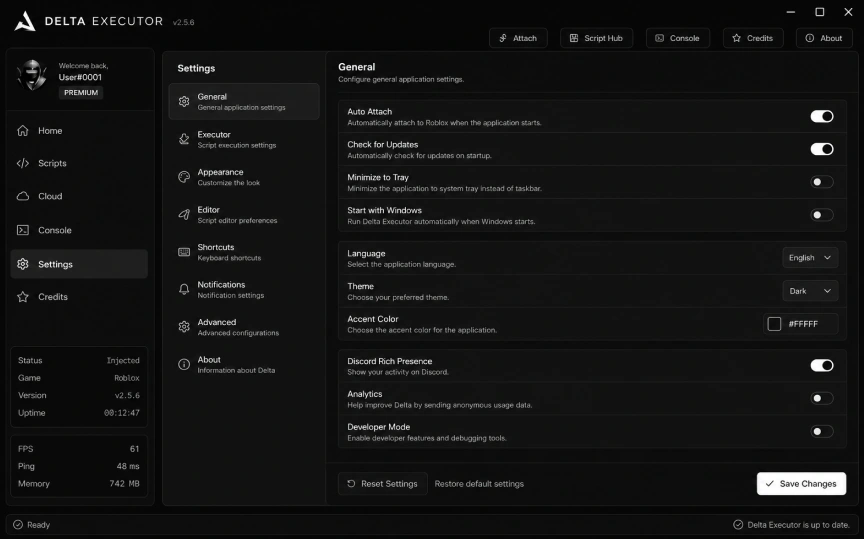
Fine-tune your experience. Configure auto-attach, execution behavior, themes, Discord RPC, and developer options all in one place.
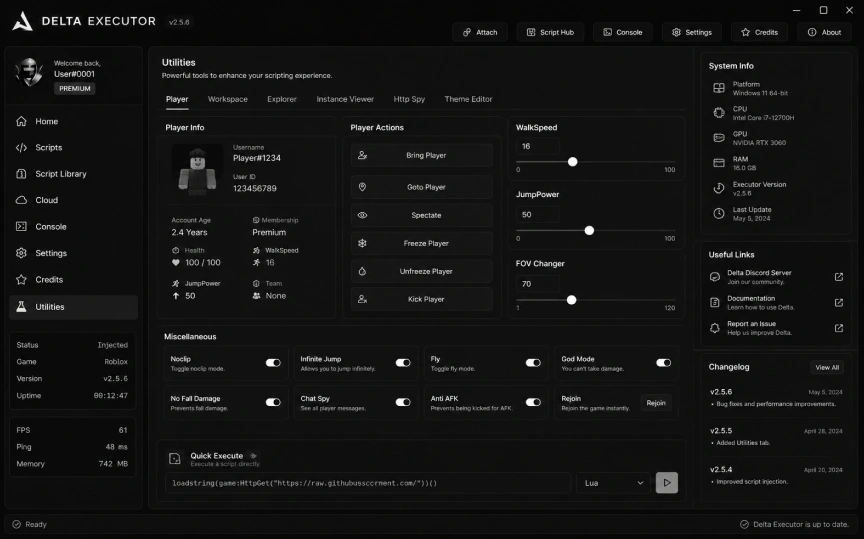
Built-in graphical interfaces to instantly modify your speed, jump power, workspace elements, and toggle god modes without writing a single line of code.
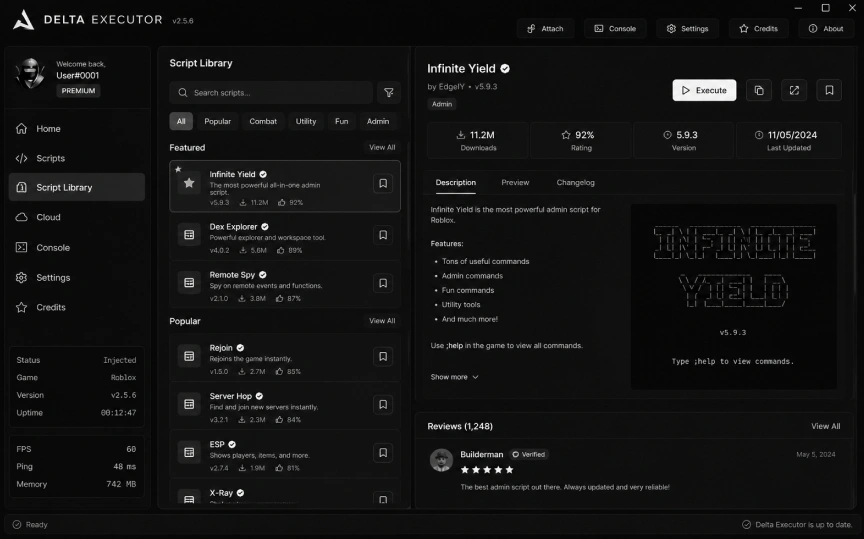
Access an integrated cloud database containing thousands of pre-verified community scripts. Search, read reviews, and execute directly from the app.
Follow these simple steps to install and run the executor safely. Select your operating system below to get started.
Get the official delta pc archive directly from our secure servers.
Temporarily turn off Windows Defender to prevent false positive flags.
Extract the ZIP folder to your desktop using software like WinRAR.
Run the executable file as Administrator to ensure full permissions.
Open your game, click attach, paste your scripts and dominate.
Download the latest delta executor APK file safely to your phone.
Enable "Install from Unknown Sources" in your device security settings.
Tap the downloaded APK file in your browser and follow the prompts.
Open the newly installed Roblox client directly from your home screen.
Login, join any experience, and the UI menu will appear automatically.
Download the MacOS disk image to natively run the delta roblox app.
Double click the downloaded DMG file to mount it on your system.
Drag the application icon into your Applications folder as instructed.
Go to System Settings > Privacy & Security and allow the app to run.
Launch the app from Applications and attach it to your running game.
Download the official delta roblox ipa file from the link below.
Use tools like AltStore, Scarlet, or Sideloadly to install the file.
Go to iOS Settings > General > VPN & Device Management and Trust it.
Open the new application icon from your home screen directly.
Hop into a server and access the floating executor icon immediately.
Track every delta executor update. From core engine patches to new Script Hub additions — every change to the delta roblox platform is documented here.
Major stability release for the delta executor apk and desktop clients. This update introduces a completely rewritten injection pipeline, faster Script Hub loading, and critical security patches across all platforms.
Pre-loaded scripts ready to run inside the delta executor Script Hub. One tap to inject — zero configuration needed.
Access the massive delta executor cloud library. Every script is verified and ready to run instantly.
Quick fixes for common issues. Select a category to find your solution instantly.
Windows Defender may flag the executor as a potentially unwanted application. This is a false positive common with all Roblox executors.
This error means your system is missing the Visual C++ Redistributable runtime library required by the executor.
This usually happens when the download was interrupted or your browser blocked parts of the file.
The executor requires .NET Framework 4.8 or later. Older Windows installations may not have it pre-installed.
The executor cannot find the game process. This happens when the game hasn't fully loaded or another executor is already attached.
Immediate crashes usually mean Roblox has updated its client and the executor needs a matching update.
Auto-attach relies on a background process monitor. If disabled or blocked, you need to enable it manually.
The script may be outdated or written for a different executor environment. Check the Console tab for error logs.
Some scripts fetch their payload from an external URL. If the host is down or your network blocks it, the script fails silently.
The script GUI may have spawned off-screen or behind the game's own UI layer.
Android blocks apps from unknown sources by default. You need to explicitly allow it before the APK can install.
The overlay requires display-over-other-apps permission on Android or proper trust settings on iOS.
Answers to the most common questions about the delta executor platform.
Download the delta executor installer directly from our official site. For Windows, extract the ZIP and run the executable as Administrator. For Android, download the delta executor apk and enable "Install from Unknown Sources". For iOS, sideload the IPA using AltStore or Sideloadly.
Yes. The delta roblox platform is completely free with no key system, no ads, and no waiting. Open the app, press inject, and start executing immediately. There are no premium tiers or hidden paywalls.
Absolutely. Delta Executor fully supports iPhone, iPad, and iPod Touch running iOS 14 or later. Install via sideloading tools like AltStore, Scarlet, or Sideloadly — no jailbreak is required. The delta executor apk for iPad environments works seamlessly.
UNC (Unified Naming Convention) is a standardized set of executor functions. Delta Executor achieves 100% UNC compliance — HTTP requests, filesystem operations, drawing libraries, and closures all work without errors on every platform.
The delta roblox executor uses next-generation anti-detection with randomized memory signatures. Zero telemetry is collected and it operates fully offline after installation. Windows Defender may flag it as a false positive — add it to your exclusions list.
Download the latest version from our official website and replace your existing installation. On Android, install the new delta executor apk over the old one. On Delta PC, delete the old folder and extract the new archive. Saved scripts and settings carry over automatically.
Delta Executor works with every Roblox experience. Popular supported games include Blox Fruits, Brookhaven, Grow a Garden, Murder Mystery 2, Fisch, Pets Go, Rivals, and over 7,000 more scripts in the built-in Script Hub.
Yes. Delta PC and the mobile app can run simultaneously. Scripts are fully cross-compatible between Windows, Android, and iOS — anything that works on delta pc works identically on mobile.